Species LogBuy

Features

Everything Species Log does today, all in the one plan. The screenshots come from a made-up company, Demo Nature Tours, with real bird names.

Bird lists on tour pages

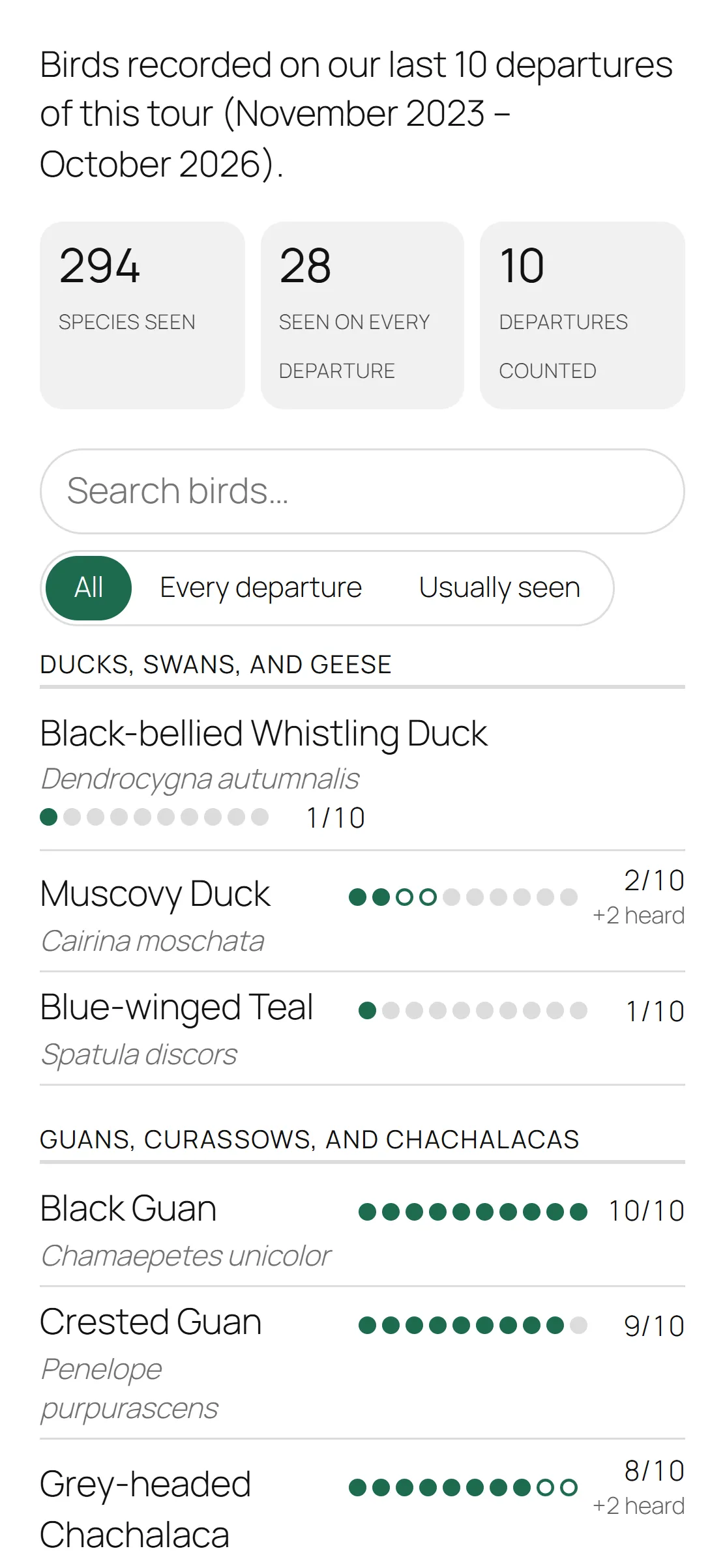
Every bird recorded on the tour’s recent departures, in taxonomic order by family, each with how often it was seen: “Seen on 8 of the last 10 departures”.

  • Birds only heard are noted separately (“8/10 +2 heard”).
  • Totals at the top: species seen, birds seen on every departure, departures counted.
  • The recent departures, each with its species count.
  • Visitors can search the list, or show only the birds seen on every departure.
  • It updates itself as new trips are logged.
  • It goes on the tour pages you already have: a block, a shortcode, or a setting that adds it to every tour page.
Visitors can filter the list or search it for a bird. Each dot is one of the last ten departures; open dots are heard only.
The same tour bird list on a phone screen: the totals, the search box and filters, and the first birds with their dots and figures.
The same list on a phone.

Trip reports

Write each departure’s trip report in WordPress. It shows on the tour’s page as a card with a cover photo, and opens as the full report on its own page.

  • Staff write in the WordPress editor, or import a guide’s Word file (.docx) or pasted text. Guides keep emailing their text; only office staff write and publish.
  • Photo rows with a credit on each photo, and a photo collage at the top.
  • A bar of dates for moving between days on a long report.
  • The departure’s species total, from its bird log. The bird list itself stays separate.
  • Report cards at the end of each tour page, or wherever you place them: a block, a shortcode, or a setting.
  • A page listing every report, with Tour and Year filters. Species Log can make the page for you.
  • Links to the same tour’s earlier and later trips, worked out from the departure dates.
  • Ready to print, with an optional footer line on every printed page.

For new reports. Older PDF reports stay where they are, and each region can link to them.

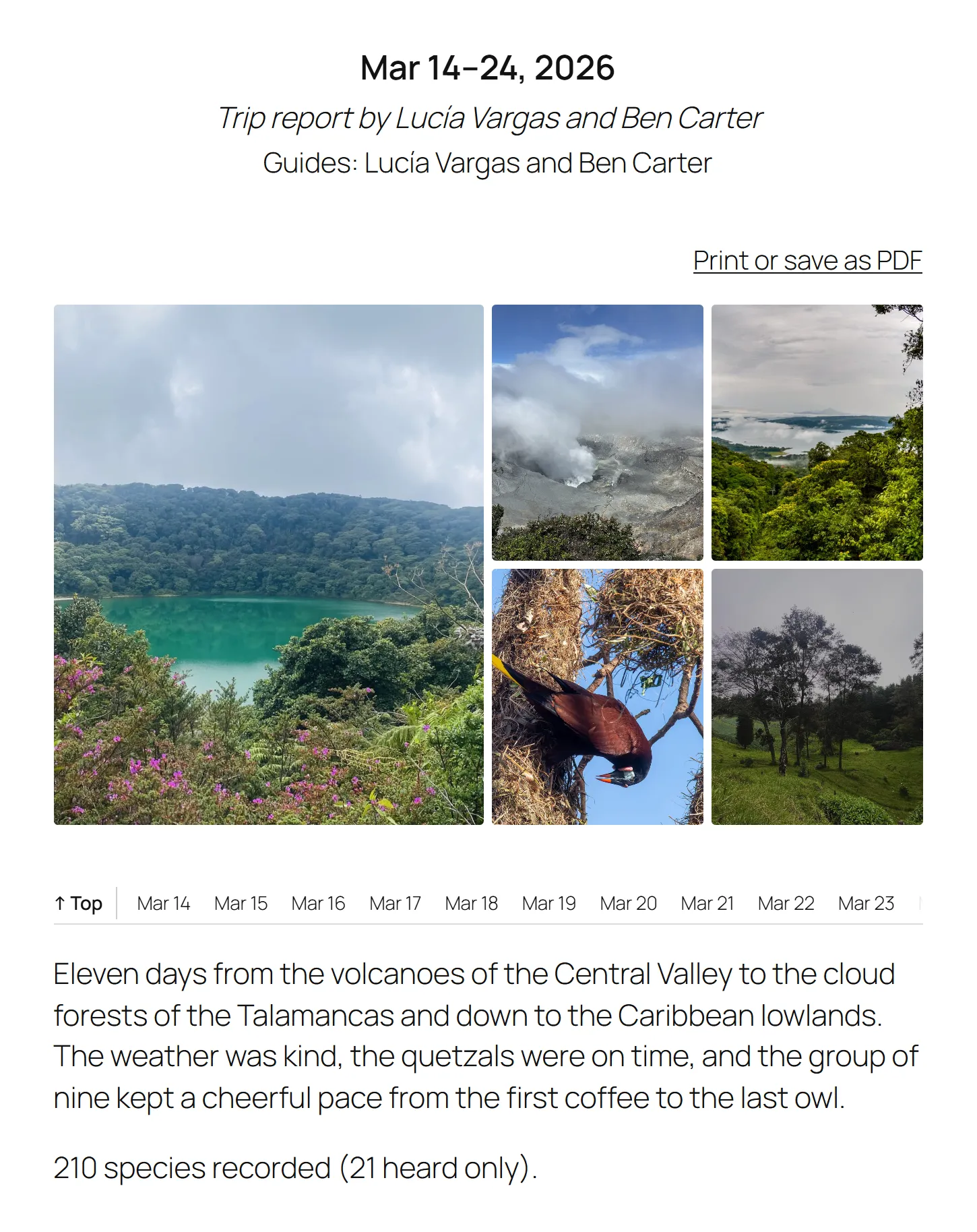
The top of a trip report: the dates, Mar 14–24, 2026, a byline and the guides’ names, and a Print or save as PDF link. Below, a collage of five photos (a crater lake, a steaming volcano crater, cloud forest, a Montezuma Oropendola at its hanging nest, and highland pasture), a bar of dates from “↑ Top” and Mar 14 onwards, the overview paragraph, and “210 species recorded (21 heard only).”
A trip report written in WordPress: the trip header, a photo collage, the day bar, and the species total from the departure’s bird log.
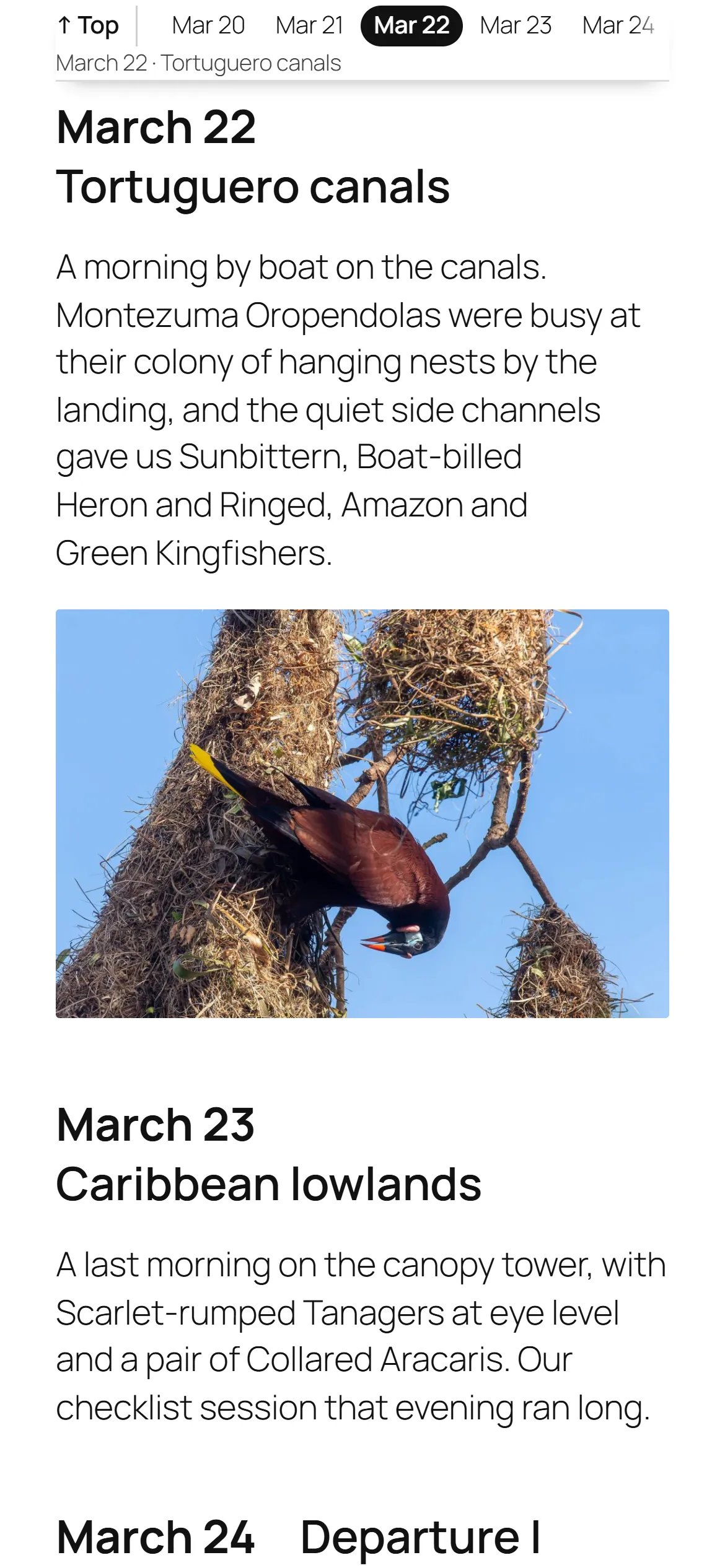
A trip report on a phone. The day bar is stuck to the top of the screen with Mar 22 highlighted and “March 22 · Tortuguero canals” under the dates. Below it, that day’s heading, a paragraph about a morning by boat on the canals, and a photo of a Montezuma Oropendola at its hanging nest, then the next day.
On a phone, the day bar stays at the top and shows the day being read.

Find tours by bird

A search you place on any page. Visitors pick the birds they hope to see and get the tours that recorded them most often, with each bird’s figure and the tour’s next departure.

  • Several birds at once: tours with all of them come first.
  • Only birds recorded on your tours are offered, so nobody searches for a bird you never see.
  • It doesn’t touch your site’s own search, so it can’t break it.
Each bird a visitor picks updates the list of tours straight away.
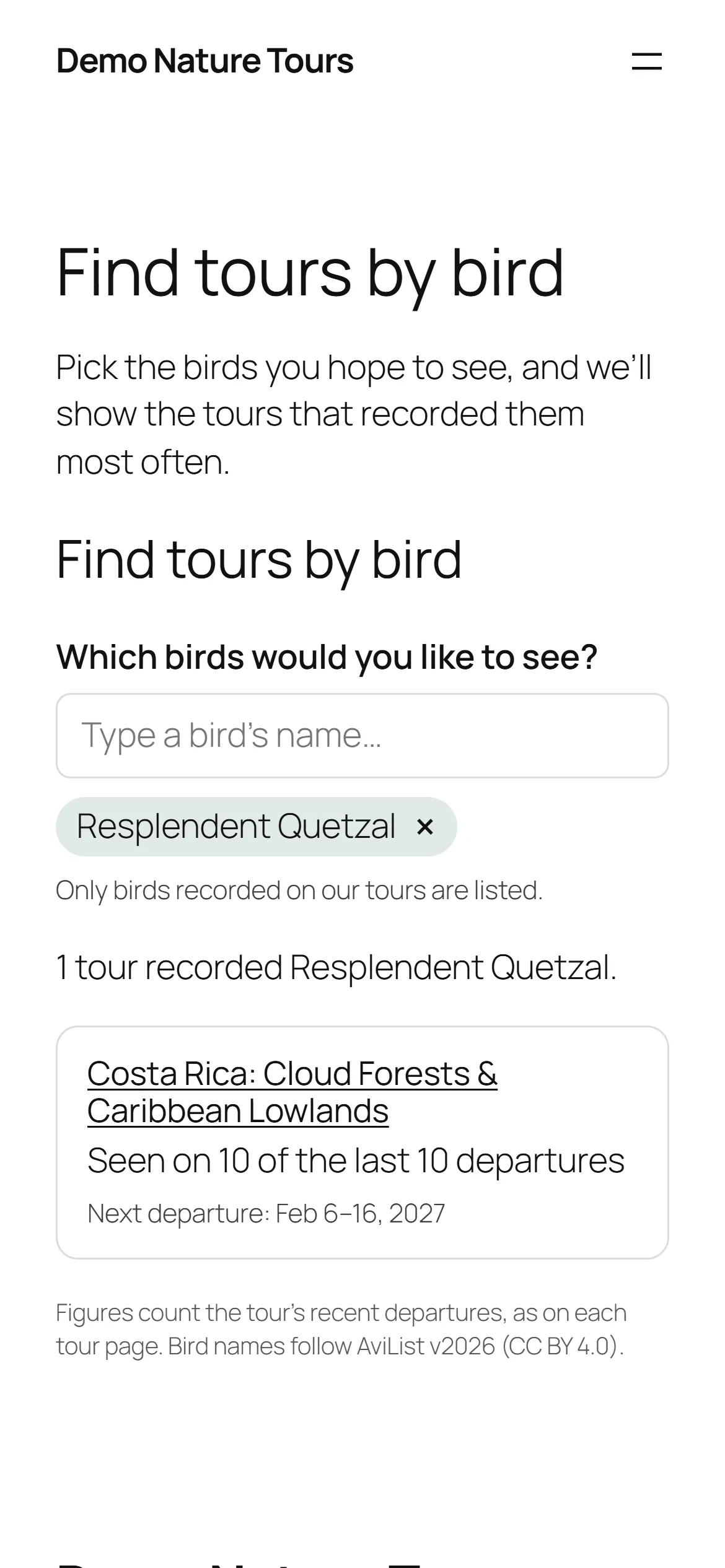
The Find tours by bird search on a phone, with Resplendent Quetzal picked and the tour that recorded it most often listed first.
Find tours by bird on a phone.

Regions

Visitors can narrow trip reports and Find tours by bird to a region, and a region includes the places inside it: Central America includes Costa Rica, Panama and the rest.

  • It uses what your tours already say about where they go, such as a tour plugin’s destinations, and never changes that plugin’s data. Sites without that get a simple Regions list in Species Log.
  • On the list of trip reports, choosing a region narrows the Tour and Year choices to match. Reports can be grouped under region headings, and each region can link to older reports kept elsewhere, such as PDFs.
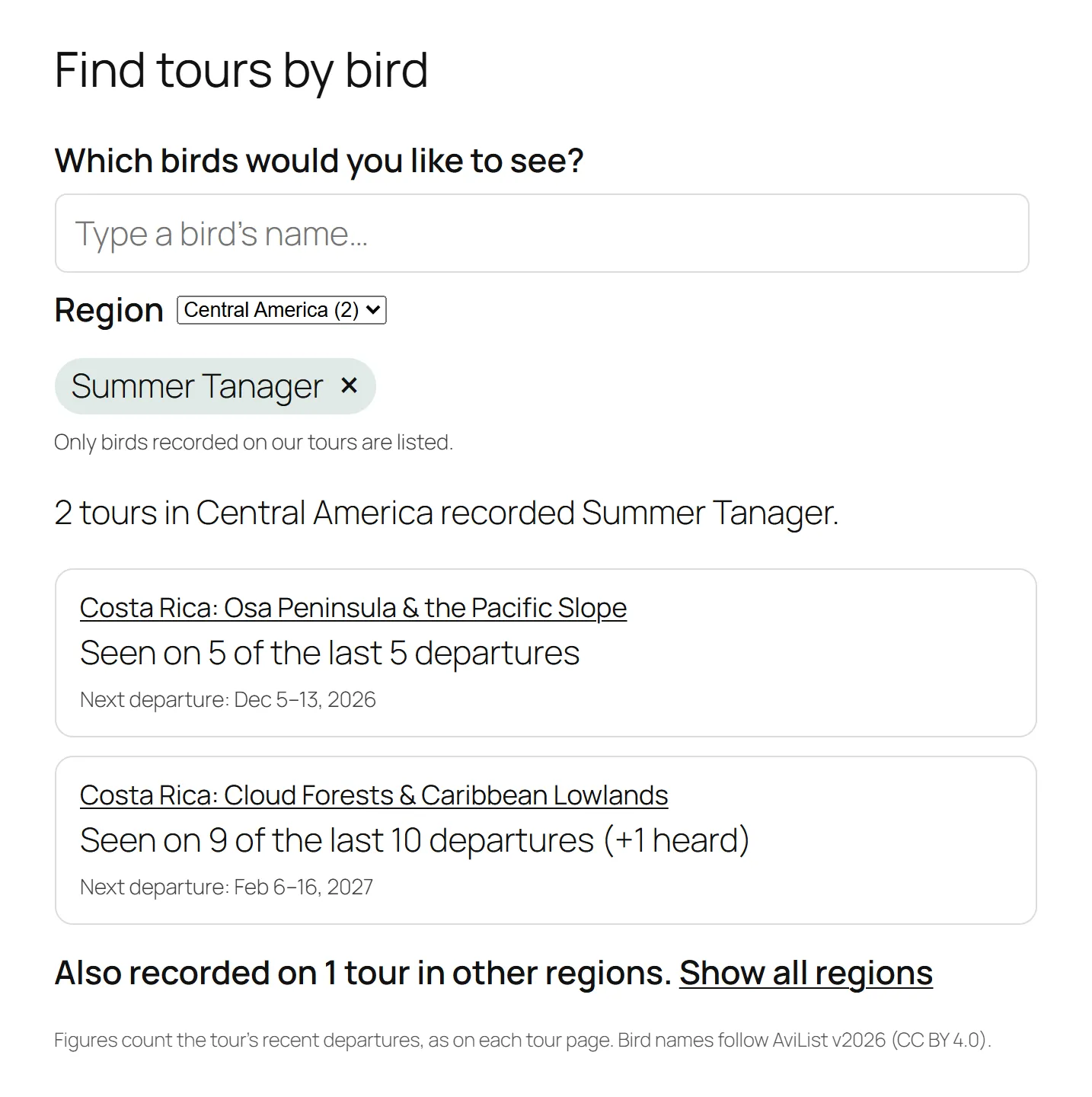
  • On Find tours by bird, a Region choice goes with the bird box and shows how many matching tours each region has: “Costa Rica (2)”. Results say “3 tours in Central America recorded Resplendent Quetzal”, with a link to tours in other regions.
  • Pages for one region, such as “Birding Costa Rica” or “Costa Rica trip reports”. Species Log can create a draft page for each region.
  • Each region choice has its own web address, so it can go in a menu.
  • Off until you switch it on in Settings, separately for trip reports and Find tours by bird.
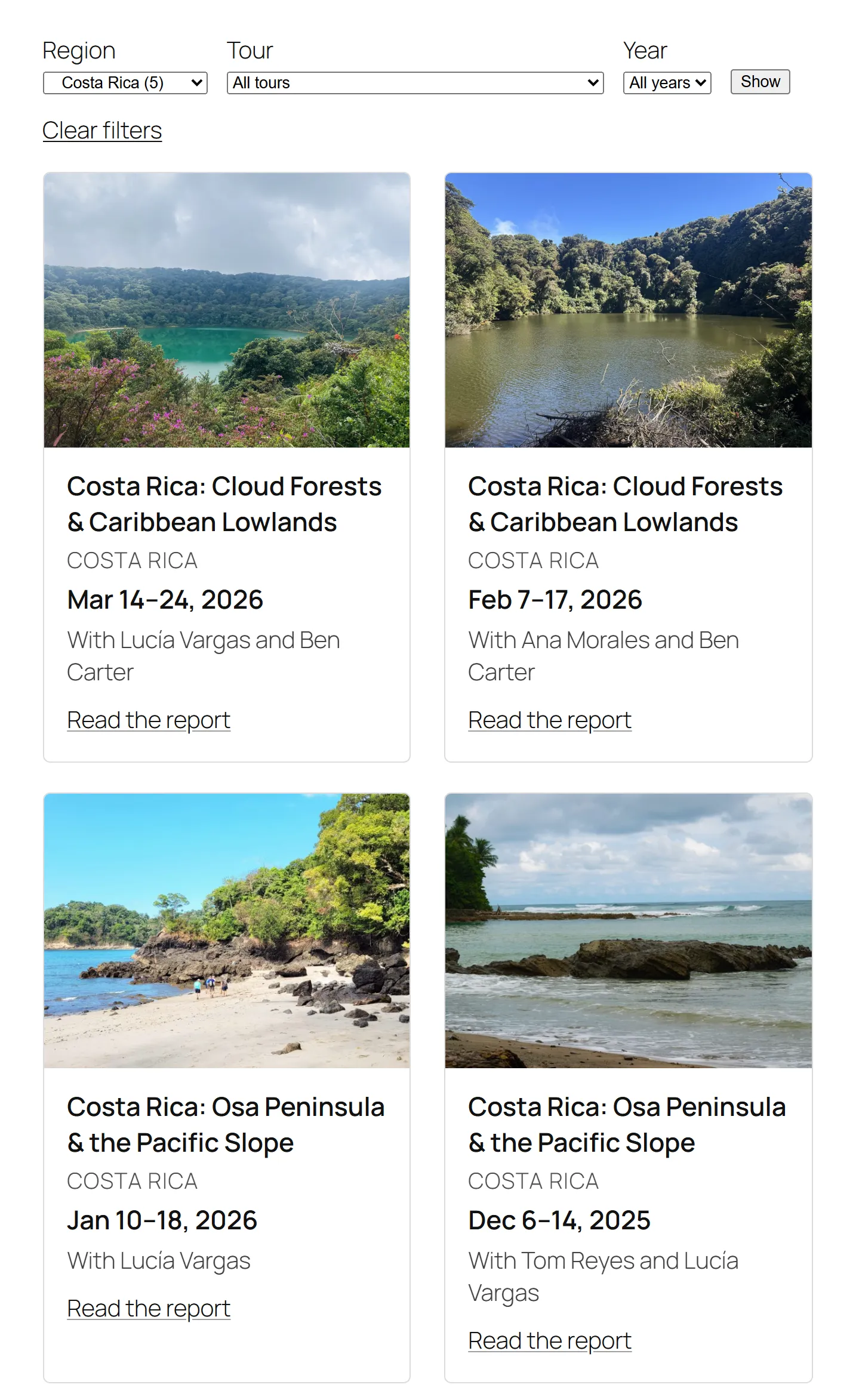
The page listing every trip report, with Region, Tour and Year filters and a Show button. Region is set to Costa Rica (5), with a Clear filters link under it. Below, four report cards in two rows, each with a cover photo, the tour’s name, its region, the dates, the guides, and a Read the report link.
The list of every trip report, narrowed to one region.
Find tours by bird with a Region choice under the bird box, set to Central America (2), and Summer Tanager picked. “2 tours in Central America recorded Summer Tanager.” Two Costa Rica tours follow: seen on 5 of the last 5 departures, and on 9 of the last 10 (+1 heard), each with its next departure. Below them: “Also recorded on 1 tour in other regions. Show all regions.”
Find tours by bird narrowed to a region, with a link to the tours in other regions.

Logging on a phone

Guides log each departure’s birds from their phone, then submit the list to the office.

  • A tick list of the birds seen on that tour before, and a search for the rest.
  • Each bird is Seen or Heard only.
  • Guides can log the same evening, or weeks later; past dates are fine.
  • Office staff can log too, so guide access is optional.
A guide opens a departure and ticks off birds as Seen or Heard.

Approve and lock

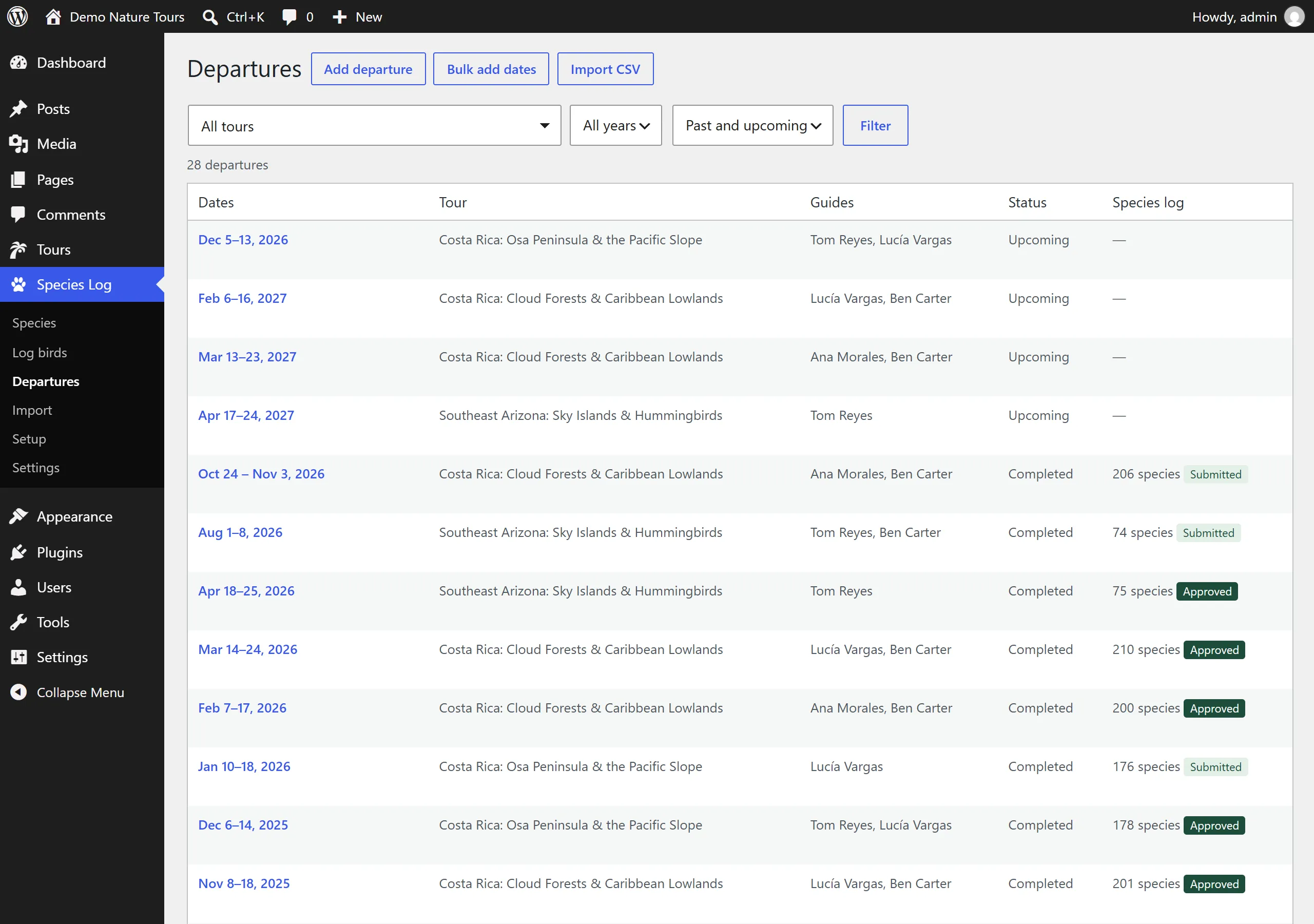
Staff see every departure, its guides, and the state of its bird list: submitted by a guide, or approved. Approving a list locks it, and records who approved it and when. A list can be reopened if something needs fixing.

Lists show on tour pages as they’re logged. Approving is how the office marks a list as checked and stops further changes.

The Departures screen in the WordPress dashboard. Buttons for Add departure, Bulk add dates and Import CSV; filters for tour, year and past or upcoming. A table lists 28 departures with dates, tour, guides, status (Upcoming or Completed) and the species log, for example "206 species, Submitted" or "210 species, Approved".
Every departure in one place, with its guides and the state of its bird list.

Bring in past trips

Your tour pages can show figures from day one, using the trips you’ve already run.

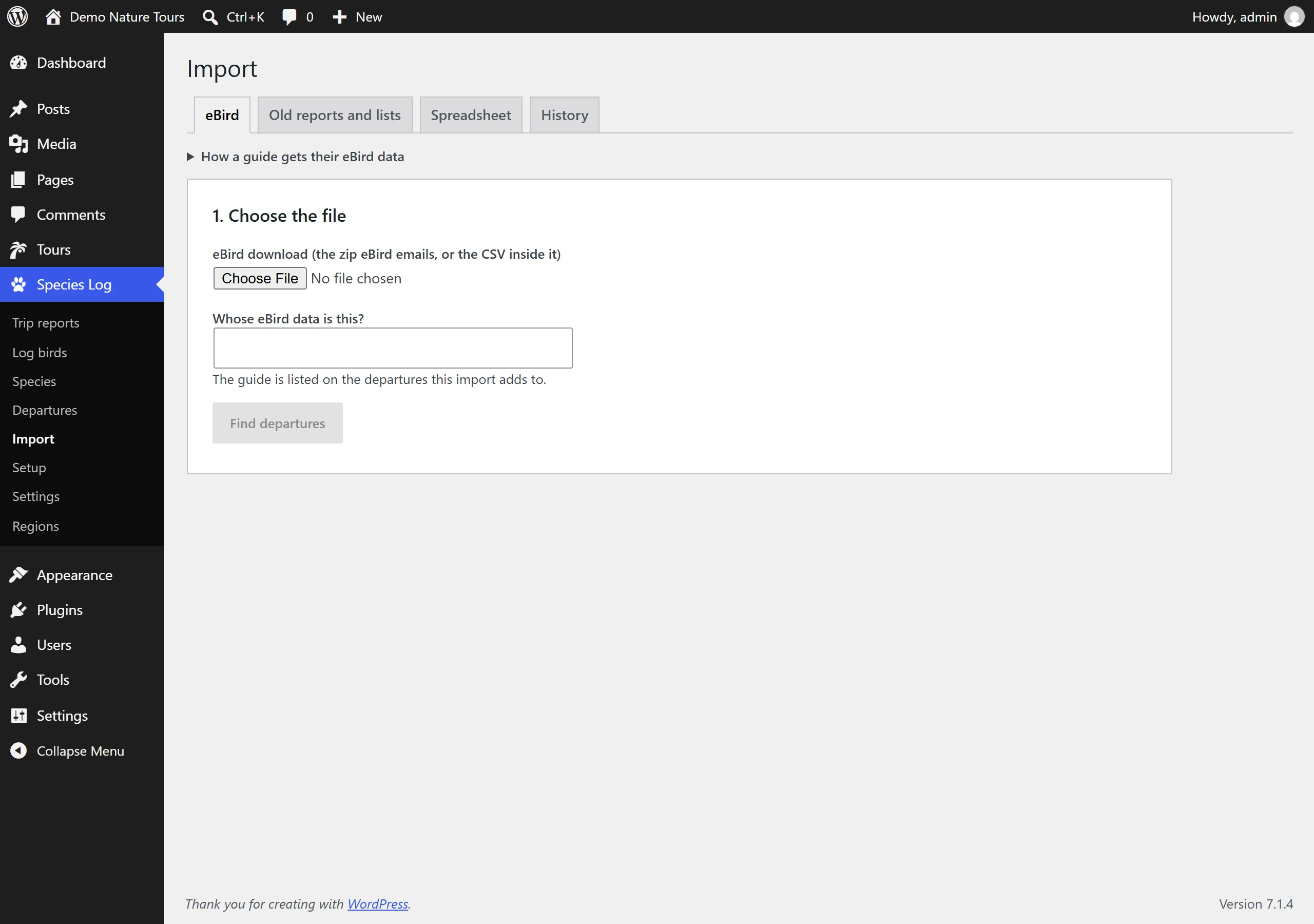
  • Imports guides’ own eBird downloads, matched to departures by date.
  • Old reports and lists: PDF reports and pasted lists, read in the browser. The files are never uploaded.
  • A spreadsheet template, for lists kept anywhere else.
  • Old and changed bird names are matched to today’s, with a review screen for anything unclear.
  • Every import can be undone.

eBird is a trademark of the Cornell Lab of Ornithology. Species Log isn’t connected with eBird; it reads the files guides download from their own eBird accounts.

The Import screen in the WordPress dashboard, with tabs for eBird, Old reports and lists, Spreadsheet and History. The eBird tab is open: choose the guide’s eBird download, say whose data it is, then Find departures.
Bring in past trips from guides’ own eBird downloads, old reports and lists, or a spreadsheet. Every import can be undone from History.

An up-to-date world bird list

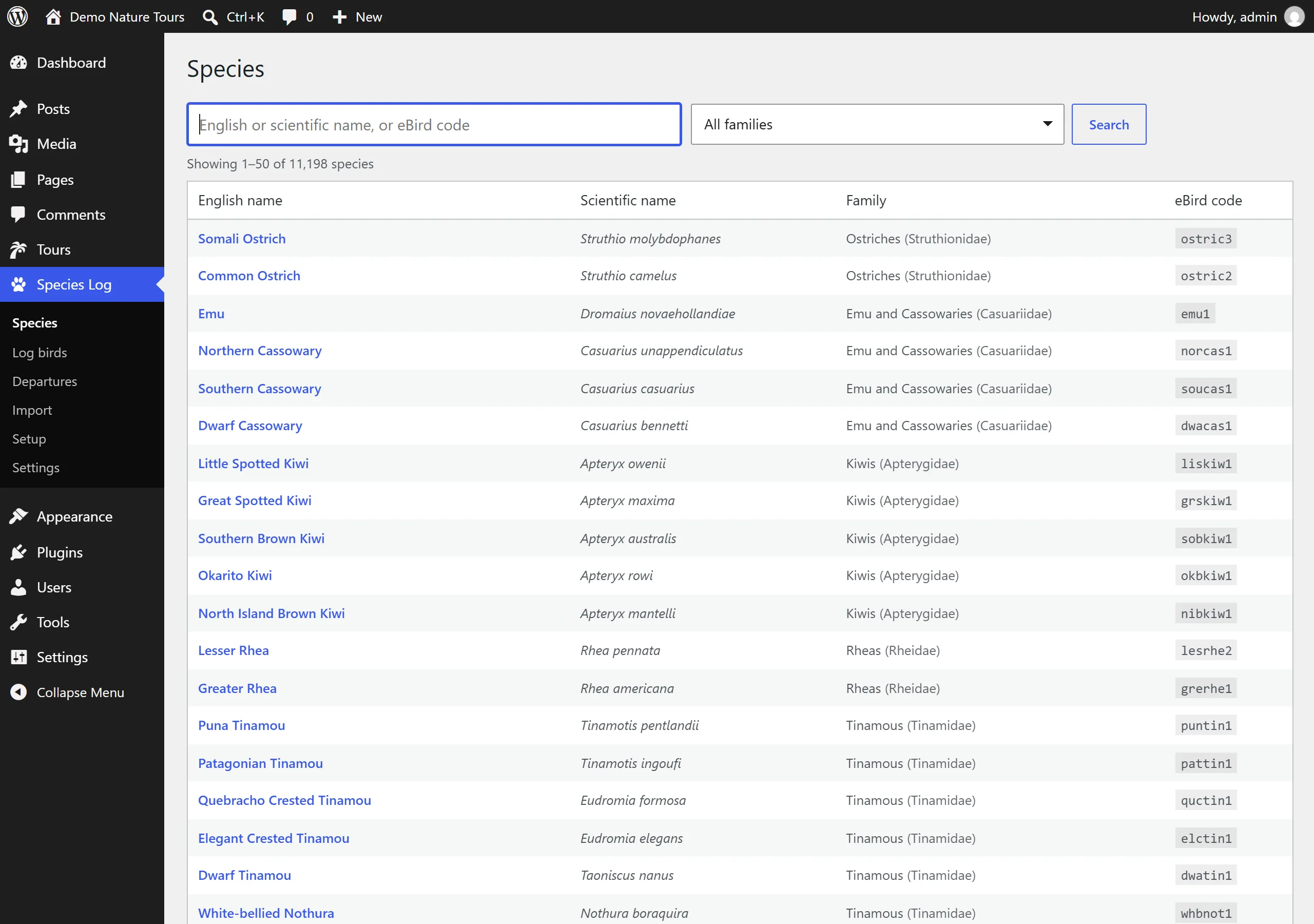
The AviList global checklist, about 11,000 species, is built in. It loads itself when the plugin is installed, and each year’s new list comes with a plugin update.

  • Guides find birds by the names they already use: AviList’s, eBird’s (Clements) or BirdLife’s.
  • When species are split or renamed, logs and imports follow, and earlier logs keep what was recorded at the time.
The Species screen in the WordPress dashboard: a search box for English or scientific name or eBird code, a family filter, and a table of species with English name, scientific name, family and eBird code, showing 1 to 50 of 11,198 species.
The full AviList world bird list, built in. Search by English or scientific name, or eBird code.

Tour series, extensions and old tours

  • A page for each departure? Many tour plugins make one. Species Log joins those pages into one tour series: every page shows the whole series’ bird list and trip reports, and Find tours by bird lists it once, linking to the next departure’s page.
  • Species Log suggests series from page addresses and names, and staff confirm them. Dates are read from the pages, new pages join their series by themselves, and pages for past departures stay part of the history.
  • Sites with one page per tour work as before; series are optional.
  • Extensions are linked to their main tour, and visitors can switch a tour page’s bird list between Main tour, Extension and All birds.
  • A tour you no longer run can keep its old lists on an unpublished tour: kept for staff, hidden from visitors. Publishing the tour later brings its history back.

Easy setup

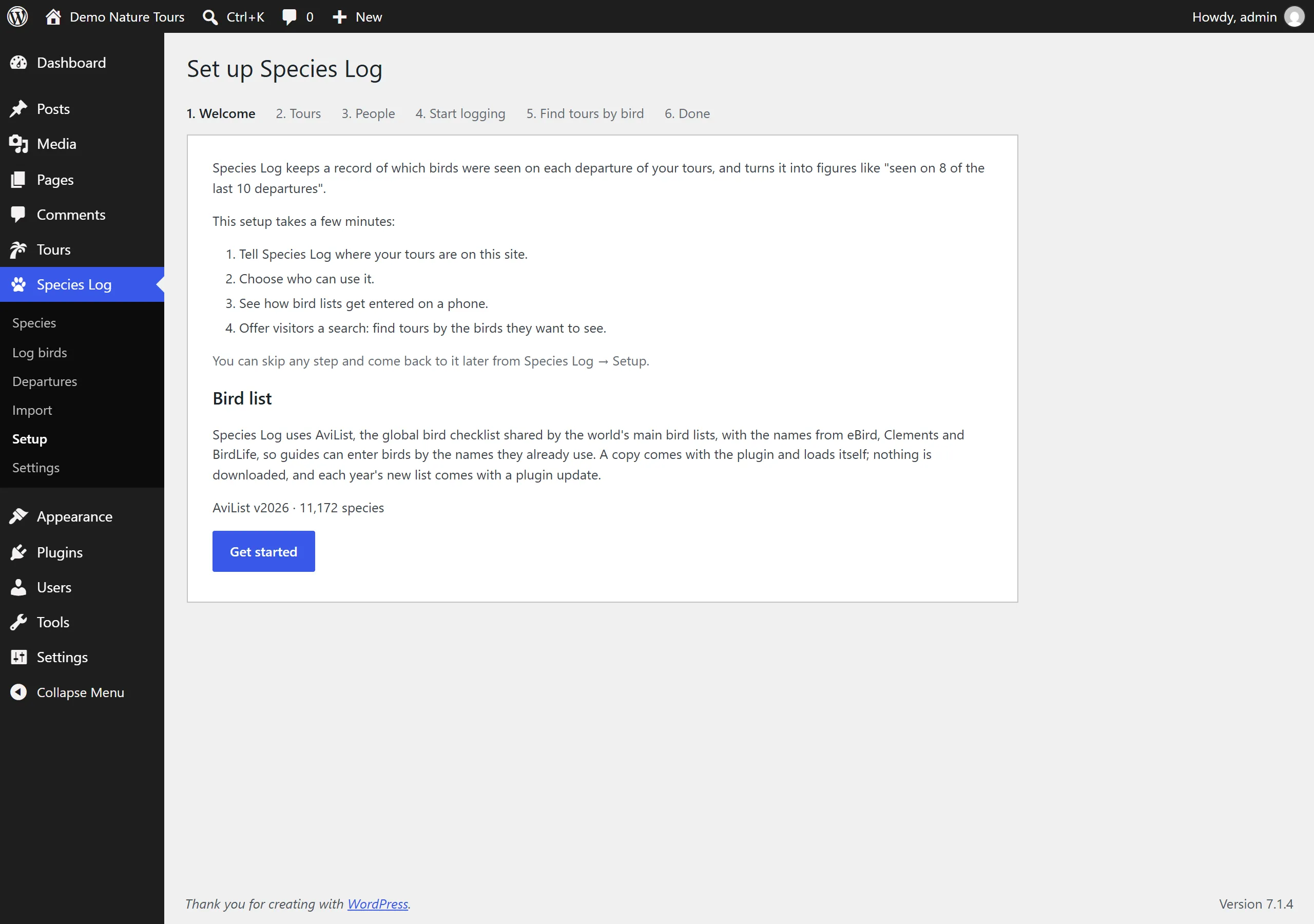
A setup wizard runs when you activate the plugin. It asks:

  • Which pages are your tours, or whether to use the built-in Tours section.
  • Who can log birds.
  • How many recent departures the figures count.
  • Whether to add a Find tours by bird page.

Any step can be skipped and changed later in Settings.

The Set up Species Log wizard, Welcome step. Steps along the top: Welcome, Tours, People, Start logging, Find tours by bird, Done. The page explains the four parts of setup and that the AviList v2026 bird list, 11,172 species, is already loaded. A Get started button.
The setup wizard takes a few minutes, and any step can be skipped and done later.

Works with any WordPress site

  • Any theme.
  • Any way of keeping tours: its own Tours section, a tour plugin’s tours, ordinary pages, or products.
  • WP Travel Engine is recognised by itself: trips are used as the tours, with departure dates and guides read from each trip. The bird list and trip reports go into the trip page as their own tabs, or into a tab you already have.
  • Your data stays on your site. Bird logs are kept in your WordPress database, not on our servers.
  • Needs WordPress 6.5 or newer and PHP 8.1 or newer.